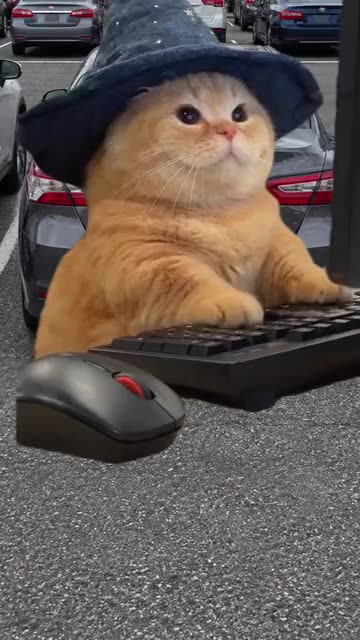
Wizard Cat Keyboard Smash: Your Pet at a Giant Keyboard

Also called: Wizard Cat Keyboard, Cat Smashing Keyboard AI, Dear Diary Wizard Cat, Pet Keyboard Smash Trend

Upload one photo of your cat or dog and Ozil Goal AI seats it behind a keyboard as big as its head, wearing a pointy wizard hat. It types away with a very serious face, stops, glares at the screen and lifts one paw. Then comes the finale you choose: a double slam, a monitor pushed off the edge, or a sulky nap on the keys. The file has no music, so add whatever sound you like in TikTok.

  • 5s HD clip from $8.88 · every pack includes a bonus preview
  • 1 photo, cat or dog
  • Tall 9:16
  • No watermark

Make my video

Still frame from the original TikTok post by @greyhouseliving

TikTok

@greyhouseliving

Original trend on TikTok

Open on TikTok ↗

The post behind this template, played straight from TikTok. Your clip is built from your own pet photo.

Quick answer

A cat in a wizard hat sits behind a keyboard the size of its head, types with a grumpy face, then stops and raises a paw. Add one photo and the finished video runs 5 seconds at 720p. The smallest pack, one video, costs $8.88: you pay once and there is no subscription. It has an AI-made soundtrack, and you can swap in the trending sound inside TikTok when you post.

By Ozil Goal AI Team · Updated

This template is part of a group: All funny templates

What does the wizard cat keyboard clip show?

Where this trend comes from

  • Use this sound: your video is timed to it, from 0s

    @greyhouseliving · TikTok · Nov 10, 2026 · The post we follow: a 7s single shot of a chubby cat in a wizard hat sitting behind an oversized computer keyboard, typing with serious paws, then lifting one paw as if to bang the keys, with a grumbling line of text over the top of the picture. It had about 1,300 plays on 18 November 2026, TikTok lists the sound as an original sound uploaded by another account, and its caption reads "Try me. Best wishes. Keyboard banging fat wizard cat."

Links open the original posts on their own platforms. We are not affiliated with these creators.

How can I turn a pet photo into a wizard cat keyboard clip?

Add one photo of your pet and pick a hat, a place and a finale. Ozil Goal AI builds the desk, the giant keyboard and the tantrum. Check a bonus preview if you like, then spend 1 credit on the 5-second 720p video and download it.

Wizard cat keyboard: common questions

Where does the wizard cat keyboard clip come from?

The post we follow is by @greyhouseliving on TikTok, from 10 November 2026. It runs 7s and had about 1,300 plays on 18 November 2026. Its caption calls the cat a keyboard-banging wizard cat. We cannot say whether it is the first of its kind.

What happens in the scene?

A cat in a wizard hat types at a keyboard bigger than its head, then glares and lifts a paw. Our version keeps that order around your pet and adds a finale you pick. More in the explainer.

Is one photo enough for the wizard cat?

Yes, one. There is a single role, your pet. Add one clear photo of a cat or dog as JPG, PNG or WebP up to 10 MB. The keyboard, the hat and the desk are generated around it.

Can a selfie of me be my only photo?

A selfie will not work here, because this template is built on an animal face and people are not accepted. Use one sharp photo of your cat or dog, ideally looking toward the lens.

Is the original sound in my video?

No. TikTok lists the post's sound as an original sound uploaded by another account. Our clip has only keyboard clatter, a dull bang and room hum, so add any sound you like when you upload.

Will the bang line up with my sound?

Roughly. The order follows the post: typing, a pause, a raised paw, the finale. The clip is generated and not timed to any track, so slide your sound until the slam lands on a beat, or use the silent copy.

Can my dog or a friend's pet do it?

Yes to dogs and to a friend's pet, as long as the owner agreed. The scene works for cats and dogs alike. People, toys, drawn characters and children are not accepted for this template.

Do I have to keep the wizard hat?

No. Pick the purple hat, the dark blue hat with stars, or no hat at all. The desk can be an office, a bedroom or a car dashboard, and the finale can be a slam, a pushed monitor or a nap.

More questions (12)

Do I have to type a prompt?

No. The camera, the cut and the order of moves are fixed. You add one photo and pick three short presets. There is no text box, and nothing from the original is copied.

Is this better than a CapCut template?

They suit different jobs. A CapCut template edits footage you already have, inside an app, so you need a clip of your pet at a desk first. Ozil Goal AI makes a new clip from one photo in the browser, with no filming and no app, but you cannot direct the exact shots.

How long does it take, and what do I get?

Expect a few minutes. You get one 5-second 720p MP4 in My videos, with a silent copy beside it. The render carries on if you close the tab.

How much would I pay for one clip?

Each full video takes 1 credit, and packs start at $8.88. Every pack adds bonus 5-second previews so you can check the likeness first. Nothing renews monthly, and downloads carry no watermark.

Is Ozil Goal AI connected to the account that posted it?

Ozil Goal AI is an independent site, so a clip built from your pet photo is not made, endorsed or licensed by the poster of the original or by the account behind the sound.

Can I post the result on TikTok or Reels?

Yes. Upload the tall file and add your sound inside the app. Because the clip is synthetic, leave the platform's AI label on when you publish.

Is the original filmed or AI-made?

TikTok's page data for the post we follow carries no AI label, and we cannot tell how it was made. Everything from Ozil Goal AI is AI-generated from your photo, so label it as AI when you post.

Does your clip use the original sound?

No. TikTok lists the post's sound as an original sound uploaded by another account, and our clip has keyboard clatter and room hum only. Add your own sound in TikTok if you want one.

Can I watch the post without leaving the page?

Yes. The player on the template page plays the TikTok post once you press play. Nothing loads from TikTok before that.

Do I write any text?

No. There is nothing to type. Your photo and three short pick-lists are all the input.

Can I leave while the video renders?

Yes. The job runs on our side, and when it ends the clip appears under your account in My videos.

What shape is the video?

Tall 9:16, sized for TikTok, Reels and Shorts. Previews are made the same way.

Ready to hand your pet a keyboard?

One photo, one bonus preview, then your pet's own meltdown.

Make my video

Questions? Email support@ozil-goal-ai.app.

Ozil Goal AI is an independent site that builds AI templates. Neither the author of the original post, TikTok nor the account behind its sound has any tie to this site, and nothing here is made, endorsed or licensed by them. No footage or sound from the original is used.